Introduction
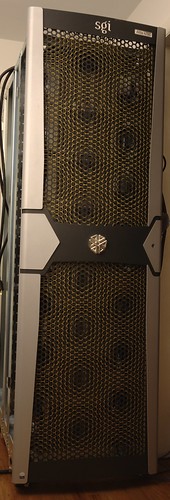
At the beginning of the year, work decomissioned the SGI Altix 4700 system that we put into production around January 2007. It sat around unused, and we had little luck finding a buyer for the system - it seems that no one is really commercially interested in running Linux on big Itanium systems anymore.
What's an Altix 4700?
Briefly, an SGI Altix 4700 is a large multi-processor SSI (single-system image) supercomputer, which uses Intel Itanium 2 (in my case, 1.6GHz, dual-core Montecito) processors, and memory on blades, which are interconnected using a "ccNUMA" architecture. This stands for "cache-coherent Non-Uniform Memory Access" - basically, a method of making large SMP-like machines by gluing processors with local memory together with a system interconnect.
With NUMA, unlike SMP, there is memory that is closer to (and thus faster from) each CPU. Like SMP, however, the system is contained in one single address space (unlike, say, a cluster which is connected using Ethernet or Infiniband). It thus runs a single OS image, and looks to the user like one large SMP system.
System Specs
The system that I have is contained within one rack, and has 4 "bricks", each with 8 processor blades, each blade containing 2 dual-core 1.6GHz Montecito and 16GB of RAM, plus one system I/O blade with disks, PCI-X slots, Gigabit ethernet, USB, etc, and assorted NUMA routing blades and system controllers.
That totals 128 system cores, and 512GB RAM. The theoretical peak GFLOP rating of the system as configured is approx 820GF. Of course, 128 CPU and 256 DIMMs draw a bit of power...
Powering/cooling a supercomputer
Running as a full system, the computer draws 9kW of power, and requires 2 x 200-240V, 30A power circuits. That's a lot of power. I pay about $0.072/kWh, so running the system for one hour costs me about $0.65.
One issue with running a system that draws 9kW is that you get 9kW of heat output. As a coworker of mine has said, at work we run heaters, that produce computation as a side-effect. The easiest and most cost-effective solution is to open up some windows, and turn on some fans. With an outside temperature of about 60F, I can set up a few fans, open some windows, and keep the temperature inside below 80F.
It is possible to deal with this problem, to make the machine a bit more friendly and less power-hungry to run -- you can run less than a full system. By pulling out the blades that you don't want to run, you can cut down the power usage by a proportional amount. For testing purposes, I have run the system with either 1/2 or 1/8 of the blades running to reduce my power usage.
One thing I've noticed is that EFI state information (its equivalent of a PC's "CMOS" configuration memory) is stored and updated only on one system blade. So, you really want to make sure that you have blade "0" (the bottom left blade in the chassis marked "001c01") installed, or booting will become much more difficult.
Installing Debian
At work, we ran the machine with SuSE. Due to licensing issues, the fact that SuSE sucks to administer, and that I prefer to run Debian on things, I got to installing Debian. The machine runs EFI, Intel's "next-generation BIOS" that is used on Itanium (IA-64) systems, and some x86 (PC like) systems such as Apple's Intel-based systems. The boot process is pretty close to PXE booting, and Debian seems to have pretty good IA-64 support. The install went smoothly - I ended up installing "Squeeze" - the next version of Debian that will be released.
Kernel changes
In general, the Debian kernel just works. However, it only has support for up to 64 cpus (cores) built in. I downloaded the latest kernel sources from ftp.kernel.org, primed the configuration with the Debian kernel config, adjusted the max number of CPUs, recompiled, and rebooted the system into the new kernel.
I should note that being able to do a make -j 64 does a lot to speed up a kernel compile... :)
Running HPL
HPL is the standard benchmark to test the effective speed of supercomputers, and is used by the ranking on the "Top500" list at http://top500.org.
HPL is also contained within the "hpcc" benchmark collection, which is how I ran the benchmark. At first, I tried the Debian package for hpcc. I got some fairly poor results, because it doesn't use an optimized "BLAS" math library. To speed things up, I went to TACC's web site and downloaded GotoBLAS2, compiled that with the added gcc option "-mtune=itanium2", copied it to /opt, and built hpcc from its source. The instructions here are useful to build these two software packages.
What next?
The systems' CPUs aren't all that fast compared to modern CPUs. For example, the rating in Gigaflops of all 128 cores is about 4 x the rating of a 3.2GHz IBM/Sony Cell BE CPU. One place that the system does have an advantage, though, is its 512GB of DDR2 memory. Someone could easily plug an Infiniband, 10 Gigabit Ethernet, or Fiberchannel card into the machine, and turn it into a pretty snappy solid-state drive, accessible over iSCSI, FCoE, Infiniband SDP, or straight FC.
The next item that I'm going to work on, is getting some FPGA blades from another Altix system working in the 4700, and test out writing code to use the FPGAs to speed up compute intensive tasks. An example of what FPGAs are typically used for is to search a genomics database for a particular DNA sequence. Basically, any algorithm that is applied to a stream of data can be a good candidate for putting into an FPGA.


